
Disclosure: Fiverr is a FreelanceMile partner, and that partnership affects where it appears in this guide. Some links are affiliate links, so I may earn a commission at no extra cost to you. The pros, cons and fees for every platform, including Fiverr, are my honest take.
The best freelance websites in 2026 are Fiverr for getting your first paid gigs fast, Toptal for experienced pros who want vetted or Marketplace work, and Upwork when you already have budget and patience for heavy competition. I’ve used Fiverr, Upwork, Freelancer.com, and Toptal Marketplace. Beginners should start on Fiverr, then Upwork, then Contra.
Key takeaways
- Start on Fiverr if you need a first client soon. Gig listings make it easier to get found without dozens of cold proposals.
- Try Toptal if you’re an experienced pro, not as a beginner first stop. It offers a screened core network and a newer Marketplace for approved talent.
- Treat Upwork as optional, not automatic. Fees and competition have been rough for about the last two years, so it’s a poor first bet if your budget is tight.
- Match the platform to the goal (first client, retainers, design portfolio, senior vetted work) instead of joining every marketplace.
- Leave when the math fails. If unpaid pitching or platform fees wipe your margin, move on.
Which freelance website should you pick by goal?
Use this quick-pick matrix first. US readers are the default; the list is still useful globally.
| Your goal | Best first pick | Strong backup | Why |
|---|---|---|---|
| First paid client (beginner) | Fiverr | Freelancer.com / PeoplePerHour | Package-style gigs and lower barrier to get found. |
| Long-term / retainer clients | Upwork | Toptal / Guru | Hourly contracts and longer engagements are common once you’re established; Toptal for vetted senior retainers. |
| Keep more take-home (lower fees) | Contra | Twine / Dribbble Pro | Contra: 0% commission on earnings (platform payment fees apply on Free; waived on Pro). Twine: 0% freelancer project commission. Dribbble Pro Standard annual + Plus: 0% designer payout fee. |
| Design / creative work | Dribbble | Fiverr / 99designs | Portfolio hiring plus creative gigs and contests. |
| Senior, vetted, higher rates | Toptal | Codeable | Screened core network plus Marketplace for approved talent. Best for experienced pros, not a beginner first stop. |
How much do freelance websites take in fees?
Fee models change often. Fees below were checked September 27, 2026 against official pages where available.
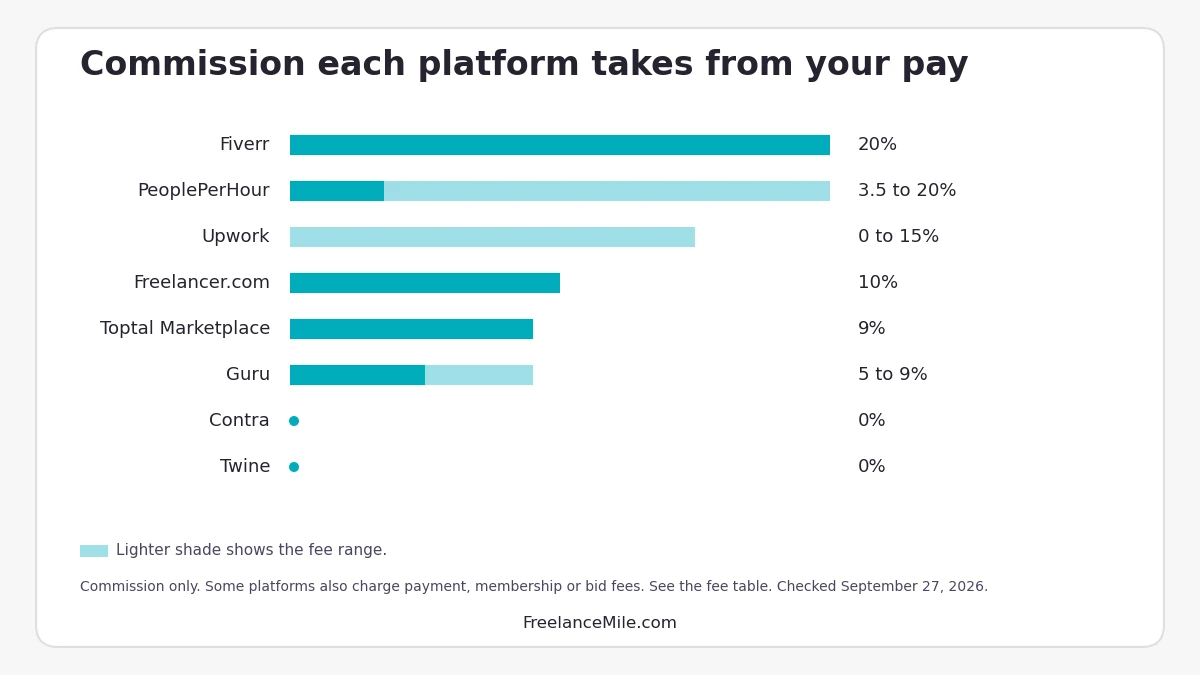
| Platform | Freelancer fee | Client / other fees | Notes |
|---|---|---|---|
| Fiverr | 20% seller fee (you keep 80%), all levels | Buyer fee: check current pricing | Seller fee checked September 27, 2026. Earnings page |
| Toptal | Marketplace: 9% service fee from application rate. Core network: no cut of your rate (you set it; client markup unpublished) | See Toptal section for full Marketplace example | Two products after talent apply. FAQ |
| Upwork | 0–15% variable per contract (new contracts from May 1, 2025; locked at proposal) | Connects: check current pricing | Service fee · Connects |
| Freelancer.com | 10% or $5 (whichever greater) fixed; 10% hourly; Preferred Recruiter 15% | Client 3% or $3; free 6 bids/mo; paid memberships; withdraw fees | Fees and charges |
| Contra | 0% commission on earnings | Free-plan platform fee $15/payment ≤$500 or $29 if >$500 (waived on Pro); Pro $29/mo or $199/yr + processor | Pricing · Commission-free |
| Guru | 9% / 7% / 6% / 5% by membership (Basic to Executive) | Membership Free to $49.95; 10 free bids / 50 on paid | Freelancer pricing |
| PeoplePerHour | Lifetime bands per buyer: 20% / 7.5% / 3.5% (thresholds in £/$/€; min fee applies) | – | Terms |
| Twine | 0% freelancer project commission | Client Vault fees; Pro for $0 txn fees | Creative pricing |
| 99designs | 1:1 designer: Entry 15% / Mid 10% / Top 5%; Intro 20% of first $500 (max $100) | Client also 5% | For designers |
| Dribbble | Non-Pro: graduated Platform Fee on payouts, 10% on the first $500, 7% on the next $500, and 4% on any amount above that (since February 5, 2026). Pro Standard (annual) and Pro Plus (monthly or annual): exempt | Pro membership required for 0% designer fee | Dribbble fee update (Feb 5, 2026) / Dribbble Pro |
| Codeable | Expert-side % not public; check Codeable pricing | Client pays 17.5% on top of estimate | Client markup model; expert % not public. Pricing |
| DesignCrowd | Designer 15% | – | Designer fees |
| FlexJobs | 0% commission (subscription job board) | Subscription; check current pricing | Not a marketplace equal. Pricing |
| SolidGigs | 0% on wins | Plan after trial; check current pricing | Lead-gen / curated jobs, not escrow marketplace. SolidGigs |
Take-home tip: Your real rate is what lands in your bank after platform fees, payment fees, and the time you spend pitching. A “free” site that burns 20 unpaid hours a week is still expensive. Use the freelance hourly rate calculator to model take-home before you commit.
What’s the best beginner path (and when should you leave)?
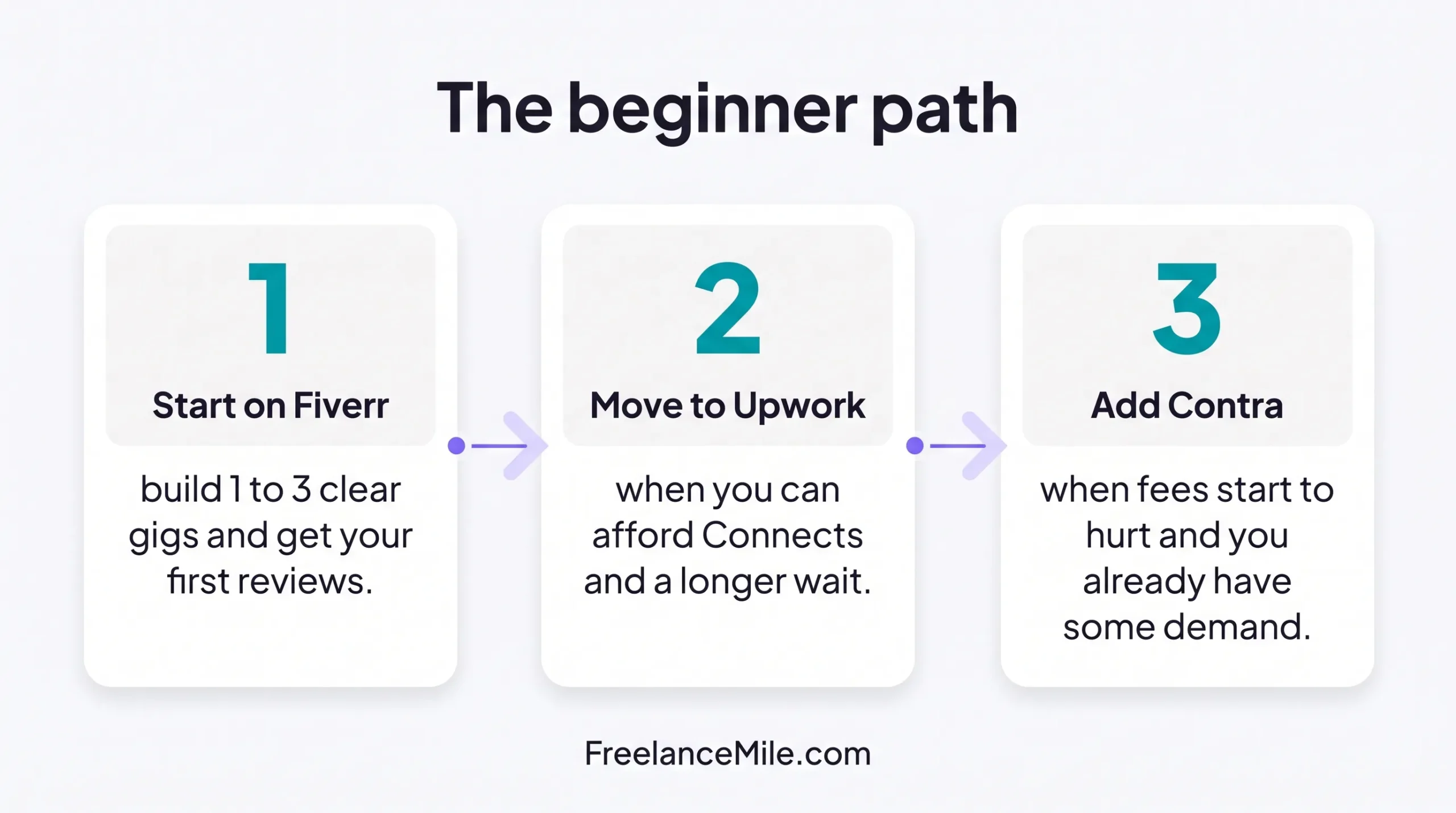
If you’re new and low on cash, follow this beginner path: Fiverr, then Upwork, then Contra. Start on Fiverr. Build 1–3 clear gigs, ship a few small orders well, then raise packages. Move to Upwork when you can afford Connects and a longer dry spell. Add Contra when fee drag matters and you already have some demand. I’ve also used Freelancer.com; it’s workable, but Fiverr is still the cleaner first stop for most beginners. Toptal is not on the beginner path.
When not to use Upwork first: If you can’t afford Connects and a long dry spell, skip it for now. Competition is high, and in my view Upwork has become costly for newer freelancers over the last couple of years. Upwork can still work later, especially if you already have reviews elsewhere or you’re writing tight proposals.
When to leave Fiverr or Upwork: Leave (or pause) when (1) your niche is saturated and price pressure never stops, (2) fees plus unpaid pitching wipe your margin, or (3) clients keep pushing you off-platform in ways that break terms or create payment risk.
Practical Upwork tip from recruiting work: I sourced and screened freelancers on Upwork. Profiles that win read like a short case study: who you help, one proof metric, and a proposal that answers the brief in the first three lines. Don’t paste a bio.
What are the top freelance websites right now?
Here are my top 10, each with honest pros, cons and current fees. Fiverr is our partner and sits at #1. It’s also where I’d send most beginners first.
1. Fiverr: best for first gigs and packaged services
Who it’s for: Beginners and specialists who sell clear packages (logos, editing, landing pages, short videos).
Pros
- Clients browse gigs, so you get inbound interest without endless cold proposals.
- Easy to test offers with Basic / Standard / Premium packages.
- Broad categories, from creative to tech.
Cons
- Race-to-bottom pricing in crowded categories.
- 20% seller fee cuts into small-ticket gigs.
- Level/badge systems can feel slow when you’re starting.
Fees: 20% seller fee (you keep 80%), all levels. Buyer fee: check current pricing on the earnings page. Checked September 27, 2026.
Tip: Launch with one narrow gig you’d buy yourself. Ship fast, collect reviews, then raise price or add an upsell. For starter ideas, see easy Fiverr gigs.
Link: Fiverr
2. Toptal: best for experienced pros
Who it’s for: Experienced freelancers (developers, designers, marketers, finance, product) who want higher-signal clients. Not a beginner first stop.
Toptal has two products:
- Screened core network (“top 3%”): selective matching and curated client intros after screening. Toptal says it accepts the top 3% of applicants. (Top 3% · FAQ)
- Toptal Marketplace: clients post jobs; approved talent applies for free. I got access by applying through Toptal’s talent application.
I’ve used Toptal Marketplace as a marketer, and I’ve landed multiple clients there.
Pros
- Application to start is free (apply).
- Marketplace lets approved talent apply to posted jobs without paying to bid.
- Higher-signal clients than typical open boards once you’re in.
- Each job post shows the client’s max hourly rate, weekly hours and time-zone overlap before you apply.
Cons
- The 9% Marketplace fee comes out of your application rate.
- Core network screening is selective; many applicants won’t land there.
Fees:
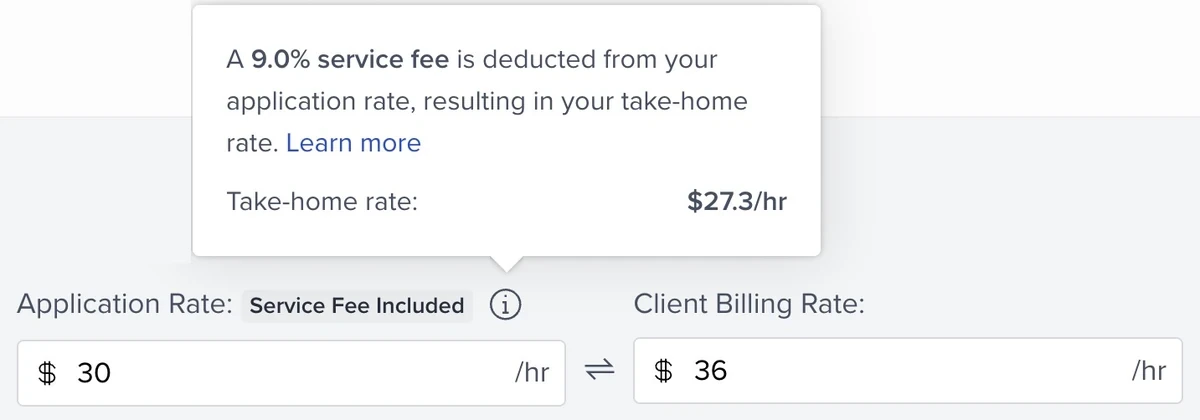
- Marketplace: 9% service fee deducted from your application rate. In my example, the client pays $36/hr and I take home $27.30/hr, so about 76% of what the client pays reaches me. (from my Marketplace rate screen)
- Core network: You set your rate; Toptal does not take a cut of that rate (client-side markup unpublished). (FAQ)
- Clients: Toptal’s FAQ lists a flat $79 monthly subscription if a client proceeds with talent matching.
Tip: If you’re already experienced, apply to Toptal before burning a big Connects budget on generic Upwork jobs.
3. Upwork: best when you already have budget and a sharp profile
Who it’s for: Freelancers who can invest in Connects, write tight proposals, and wait out competition.
Pros
- Huge job volume across writing, design, marketing, and development.
- Strong for ongoing hourly or retainer work once you’re in.
- Escrow and contract tools are mature.
Cons
- Fees and Connects add up before you win work.
- Heavy competition on generic jobs.
- Easy to overbid and underprice while chasing Job Success metrics.
Fees: 0–15% variable freelancer service fee per contract (new contracts from May 1, 2025; locked at proposal). Connects: check current pricing. Include Connects in your math. (Service fee · Connects)
Tip: From recruiting and screening on Upwork: mirror the client’s words, attach one relevant sample, and ask one smart clarifying question. Skip the life story.
4. Freelancer.com: best as a secondary open marketplace
Who it’s for: Freelancers who want another open board beyond Upwork, including contests and milestone projects.
Pros
- Large project volume and many categories.
- Contests can work for certain design niches (with caveats).
- Milestones help structure delivery. Free 6 bids/month.
Cons
- Bidding can get noisy and low-ball.
- Membership tiers gate features; Preferred Recruiter carries a higher talent fee (15%).
- Quality varies a lot by category.
Fees: Talent 10% or $5 (whichever greater) on fixed; 10% hourly; Preferred Recruiter 15%. Client 3% or $3. (Fees)
Tip: Use it as a supplement, not your only lead source. Filter hard for budget and client history.
5. Contra: best for keeping more take-home (0% commission)
Who it’s for: Independents who want commission-free earnings and are fine with modern independent tooling.
Pros
- 0% commission on earnings.
- Clean independent-first positioning.
- Pro waives Free-plan platform payment fees.
Cons
- Free plan still charges platform fees per payment ($15 ≤$500 / $29 if over).
- Smaller demand than Fiverr/Upwork.
- Pro subscription adds monthly/annual cost.
Fees: 0% commission. Free-plan platform fee $15/payment ≤$500 or $29 if >$500 (waived on Pro). Pro $29/mo or $199/yr + processor. (Pricing)
Tip: If fee drag is your main pain on Fiverr or Upwork, model Contra’s Free vs Pro math before you switch.
6. Guru: best for escrow-style projects with clearer SafePay flow
Who it’s for: Freelancers who want an alternative US-friendly marketplace with project workspaces.
Pros
- SafePay / escrow style payments.
- Workrooms help keep files and messages in one place.
- Less crowded than Upwork in some niches.
Cons
- Smaller overall demand than the big three.
- Membership levels change job fee (9% to 5%) and bid counts.
- Older UI than newer apps (varies by user).
Fees: Job fee 9% / 7% / 6% / 5% by membership (Basic to Executive). Membership Free to $49.95. Bids: 10 free / 50 on paid. (Freelancer pricing)
Tip: Treat Guru as a second inbox after Fiverr or Toptal, not a full-time hustle.
7. PeoplePerHour: best for UK/EU-leaning hourly and project work
Who it’s for: Freelancers open to UK and European clients, plus “Hourlies” style fixed mini-offers.
Pros
- Hourlies make small scoped offers easy to buy.
- Solid project board for marketing, design, and tech.
- Useful geographic mix if you want non-US buyers.
- Lifetime fee bands drop as you earn more with the same buyer.
Cons
- Smaller than Upwork/Fiverr globally.
- Early band is 20% until you pass the first threshold with that buyer.
- Some categories feel thin depending on week.
Fees: Lifetime per-buyer bands: 20% / 7.5% / 3.5% (thresholds in £/$/€; min fee applies). (Terms)
Tip: Pair one strong Hourlie with a portfolio case study; don’t list 20 weak offers. For a UK-focused roundup, see best freelance websites UK.
8. Twine: best for creatives who want 0% project commission
Who it’s for: Creative freelancers who want project pay without a freelancer % take.
Pros
- 0% freelancer commission on project pay.
- Creative-focused positioning.
- Pro option for $0 transaction fees.
Cons
- Smaller than mega-marketplaces.
- Client Vault / Pro costs still affect the deal math.
- Less useful if you only chase high-volume generic gigs.
Fees: 0% freelancer project commission; client Vault fees; Pro for $0 txn fees. (Creative pricing)
Tip: Use Twine when fee drag matters more than raw job volume.
9. 99designs: best for design contests and 1:1 design work
Who it’s for: Designers comfortable with contests and packaged 1:1 design levels.
Pros
- Clear designer levels (Entry / Mid / Top) with falling % fees.
- Contests plus 1:1 work in one brand.
- Strong recognition with design buyers.
Cons
- Contests can mean unpaid speculative work if you don’t win.
- Entry-level 1:1 fee is 15%; Intro fee on first $500.
- Not ideal for non-design freelancers.
Fees: 1:1 designer Entry 15% / Mid 10% / Top 5%; client also 5%. Intro 20% of first $500 (max $100). (For designers)
Tip: Treat contests as marketing only if your win rate and portfolio ROI justify the unpaid hours.
10. Dribbble: best for design portfolio hiring
Who it’s for: Designers, illustrators, and brand freelancers who win work from a polished portfolio and Hiring leads.
Pros
- Portfolio is the product; clients browse work.
- Hiring + community in one place.
- Pro Standard annual + Plus can mean 0% designer payout fee.
Cons
- Non-Pro payout fees still apply (10% / 7% / 4% tiers from February 5, 2026).
- Discovery takes consistent publishing.
- Not a full escrow generalist marketplace like Fiverr/Upwork.
Fees: As of February 5, 2026, Dribbble applies a graduated Platform Fee to non-Pro payouts: 10% on the first $500, 7% on the next $500, and 4% on any amount above that (Dribbble, Feb 5, 2026). Pro Standard (annual) and Pro Plus (monthly or annual) subscribers are exempt from fees on their payouts. (Dribbble Pro)
Tip: Publish case studies with problem, process, and result, not only pretty stills.
What other platforms are worth knowing?
These didn’t make the main ranked list, but they’re useful in the right niche:
- Codeable: Vetted WordPress experts; scoped quotes. Client pays 17.5% on top of the estimate; expert-side % is not public. Check Codeable pricing.
- DesignCrowd: Designer fee 15%. Contest/crowdsourced design alternative to 99designs. (Fees)
- FlexJobs: Subscription job board (no commission on wins). Useful for remote/flexible roles; not a freelance escrow marketplace equal. Check current pricing.
- SolidGigs: 0% on wins; curated freelance leads / plan after trial (check current pricing). Lead gen, not classic escrow marketplace.
- Workana: a freelance marketplace focused on Latin America.
- Wellfound (formerly AngelList): Startup jobs and contract roles; treat as a job board hybrid, not a classic freelance escrow marketplace.
- Codementor: Mix of mentoring and freelance developer help; different motion than pure marketplaces.
How should you categorize freelance websites (and what’s outdated)?
Not every “freelance jobs” site is a marketplace. Mixing them confuses beginners.
True marketplaces (escrow / gigs / proposals): Fiverr, Upwork, Freelancer.com, Guru, PeoplePerHour, Contra, Twine, 99designs, and similar platforms where work and payment usually stay on-site (or close to it).
Vetted talent networks / hybrid: Toptal, Codeable. Higher average client quality than open bidding wars. (Full Toptal product split is in the Toptal section above.)
Portfolio / community boards: Dribbble (Hiring). Great for discovery; payment/payout rules depend on Pro tier.
Job boards / lead gen (not equal to marketplaces): FlexJobs, SolidGigs, Wellfound, Indeed, CareerBuilder, SimplyHired, Idealist, and similar. They list roles or package leads, but they are not freelance marketplaces with built-in escrow. Useful as side search tabs, not as your core “Top freelance websites” equals.
Status callouts
- Working Not Working: no longer available. Removed from recommendations.
- Stack Overflow Jobs: no longer available. Removed as a live jobs product.
- AngelList to Wellfound: Rebranded; keep only if you need startup contract/job leads, and label it correctly.
FAQ
Do I need more than one freelance website?
Usually two is enough: one volume platform (Fiverr or Freelancer.com) and one quality or low-fee lane (Toptal if you’re an experienced pro, or Contra if fees are the pain). Beginners should follow the path in the beginner section above. Five profiles you ignore will not help.
Is Upwork still worth it in 2026?
Yes for some freelancers with a sharp niche and proposal craft. No as a default first step if your budget is low. Cost (variable fee + Connects) and competition are the blockers, not a total lack of jobs.
Can beginners get clients on Fiverr?
Yes. Start narrow, price to learn, deliver early, and collect reviews before you chase premium rates. Plan around the 20% seller fee on small tickets.
How does Toptal work: is it an open marketplace?
Not quite. Clients post jobs on Toptal Marketplace, but only approved talent can apply. I got access by applying through Toptal’s talent application, and I’ve used Marketplace as a marketer with multiple clients there. Full product split, fees, and the take-home example are in the Toptal section above. See also FAQ and Top 3%.
Which freelance website pays the most?
None “pays the most” by default. Your rate, niche, and client quality matter more than the logo. Vetted networks often support higher rates; open markets often support faster first wins at lower average prices. Commission-free options (Contra, Twine) help take-home once you have demand.
What should you do next?
Pick one path this week: open a focused Fiverr gig if you’re starting out (then Upwork, then Contra), or start a Toptal application if you’re already an experienced pro. Don’t join six sites and stall.
If you’re still defining the work itself, read what freelancing is and how to start freelancing with no experience. Then come back and choose the platform that matches the goal in the matrix above.